
Back to Home

$addTextDisplay
$addTextDisplay adds a text display component to the message. Text displays show text in containers, sections, or standalone without a parent.
Syntax
$addTextDisplay[Content;(Container/Section ID)]Content: the text to display.Container/Section ID: optional ID of the container or section to attach this text to. Leave empty to use the text standalone (not inside any parent).
What happens
$addTextDisplaycreates a text display with the content you provide.- If you provide a parent ID, it attaches to that container or section.
- The text appears in your message.
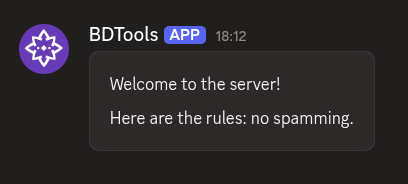
Example 1: Text display inside a container
$addContainer[main]
$addTextDisplay[Welcome to the server!;main]
$addTextDisplay[Here are the rules: no spamming.;main]What happens:
$addContainercreates a container.- Two
$addTextDisplaycalls add text inside that container.
The container shows both lines of text, stacked vertically.
Example 2: Text display inside a section
$addSection[info]
$addTextDisplay[Check out this image;info]
$addThumbnail[https://example.com/image.png;Example;;info]What happens:
$addSectioncreates a section.$addTextDisplayadds text to the section.$addThumbnailprovides the required accessory for the section.
The section shows the text with a thumbnail beside it.
Example 3: Standalone text (no parent)
$addTextDisplay[Hello, world!]
$addTextDisplay[This text has no container or section around it.]
What happens:
- Both
$addTextDisplaycalls omit the Container/Section ID parameter. - Each text display appears on its own, not nested inside any parent component.
The text appears as plain message content without any container styling.
Common uses
- Adding descriptions or labels to containers and sections
- Displaying multiple lines of information
- Standalone text when you don't need container styling
See also
- $addContainer: to create a container for the text
- $addSection: to create a section for the text