
Back to Home

$addSection
$addSection creates a section component. A section groups a $addTextDisplay with an accessory: either a $addThumbnail or a $addButtonCV2. Sections can go inside containers.
Syntax
$addSection[ID;(Container ID)]ID: a name to identify this section. Other components use this ID to attach themselves to it.Container ID: optional ID of the container to put this section inside.
What happens
$addSectioncreates a section with the given ID.- You add a text display to it with
$addTextDisplay. - You add an accessory:
$addThumbnailor$addButtonCV2. - The section displays the text with the accessory beside it.
Example 1: Section with a thumbnail
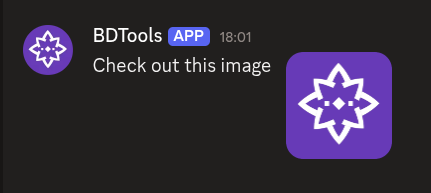
$addSection[info]
$addTextDisplay[Check out this image;info]
$addThumbnail[https://example.com/image.png;Example image;;info]What happens:
$addSectioncreates a section.$addTextDisplayadds text to the section.$addThumbnailadds a thumbnail image to the section.
The section shows the text with the image on the side.
Example 2: Section with a button
$addSection[standalone]
$addTextDisplay[Click the button;standalone]
$addButtonCV2[exampleButton;Click Me;secondary;;;standalone]What happens:
$addSectioncreates a section directly on the message.$addTextDisplayadds text to the section.$addButtonCV2adds a button as the section's accessory.
The section shows the text with a button beside it.
Common uses
- Displaying info with an image using a thumbnail
- Adding a button to a block of text
- Structuring messages with multiple content blocks inside a container
See also
- $addContainer: to create a container for the section
- $addTextDisplay: to add text to the section
- $addThumbnail: to add a thumbnail to the section
- $addButtonCV2: to add a button to the section