
Back to Home

$addContainer
$addContainer creates a container component. A container is a top-level component that groups other components together. Containers can hold $addSection, $addActionRow, $addMediaGallery, $addTextDisplay, and $addSeparator.
Syntax
$addContainer[ID;(Color;Spoiler)]ID: a name to identify this container. Other components use this ID to attach themselves to it.Color: optional color for the container (e.g.ff0000for red).Spoiler: optional. Set totrueto mark the container as a spoiler.
What happens
$addContainercreates a container with the given ID.- Other components that reference that ID are placed inside it.
- The container groups those components visually in the message.
Example 1: Basic container
Create a container and put a text display inside it:
$addContainer[main]
$addTextDisplay[Welcome to the server!;main]What happens:
$addContainercreates a container namedmain.$addTextDisplayattaches its text to that container.- The message shows the text grouped inside the container.
To add more components, reference the same container ID. See $addTextDisplay for details.
Example 2: Container with a color
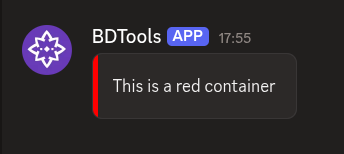
Create a red container:
$addContainer[panel;ff0000]
$addTextDisplay[This is a red container;panel]What happens:
$addContainercreates a container with a red border/background.$addTextDisplayadds text inside that container.
The color applies to the whole container. Components inside it share the container's visual grouping.
Common uses
- Grouping related components together in a single visual block
- Organizing complex messages with multiple sections and action rows
- Adding color or spoiler markings to parts of a message
See also
- $addSection: to create a section inside a container
- $addActionRow: to create an action row inside a container
- $addTextDisplay: to add text to a container
- $addSeparator: to add a visual divider inside a container